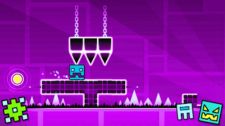
Geometry Jump 2 takes the core mechanics of the original and adds layers of environmental hazards that make simple jumping a thing of the past. If you’re finding the new levels frustrating, it’s likely because you’re still playing with a 1.0 mindset.
While the first game was mostly about memorizing jump distances, Geometry Jump 2 focuses heavily on momentum management and mid-air adjustments. It’s no longer just about when you tap, but how long you hold and how you react to the shifting gravity fields. If you feel the physics here are a bit too heavy, you might want to warm up with Geometry Dash Breeze, which offers a slightly smoother learning curve before you tackle these advanced hazards.
What’s Actually New in Geometry Jump 2?
There's one thing about Geometry Jump 2 that I bet many people will get confused about when they first play: Variable Jump Heights. The game no longer has a default jump style; the longer you hold down the key, the higher the icon flies. This small detail makes the 'triple spike' sections much more challenging. You have to relearn how to feel the buttons if you don't want to be constantly eliminated for jumping too high or too low.
- Gravity Orbs: These aren't just for jumping. In Geometry Jump 2, hitting an orb mid-air can sometimes reset your momentum entirely, which is crucial for landing on tiny platforms. This mechanic is quite different from the straight-line flying you see in Geometry Arrow, where maintaining a constant trajectory is the main goal.
- The "Ghost" Platforms: Some platforms now disappear after a single touch. I’ve found that the best way to handle these is to aim for the very edge of the platform to maximize your take-off time.
Advanced Tactics for High-Level Play
To get through the "Extreme" rated levels, you need to look beyond basic timing.
Master the "Late Jump"
Most players fail because they jump too early when they see a spike. In Geometry Wave Hero, the hitboxes are slightly more forgiving at the back. By delaying your jump until the very last frame, you give yourself more airtime to clear the secondary obstacles that often follow a main spike.
Listen to the Off-Beat
The music in this sequel is more complex. The developers have hidden some of the most dangerous traps on the off-beat. If the traditional cube gameplay is starting to feel repetitive, I recommend switching gears to Geometry Wave Hero. It uses a similar rhythm-heavy focus but forces you to master tight zig-zag movements instead of just jumping.
The "Symmetry" Strategy
Many levels are designed with a hidden symmetry. If you see a pattern of three jumps up, there is almost always a corresponding pattern of three drops or slides coming next. Recognizing these patterns early can save you from a lot of unnecessary 'Practice Mode' sessions.
FAQs
Why is my icon sliding after a jump?
This is a new physics mechanic in Geometry Jump 2 called Ice Friction. If you land while moving at high speed, your icon will slide for a few frames. You need to compensate by jumping slightly earlier than you think for the next obstacle.
Is there a way to slow down the game?
Not in the main levels. However, using Practice Mode allows you to set checkpoints (Green Flags). I highly recommend using these to break down long sequences into 5-second chunks rather than trying to learn the whole map at once.
Does Geometry Jump 2 have secret levels?
Yes. Secret coins are hidden behind "fake" walls that look identical to solid blocks. If you see a spike pattern that looks "too easy" or has an empty gap above it, there’s a high chance a secret path is hidden there.